


Blog
Best Practices for Maintaining the Pacvac 4-Battery Charging System

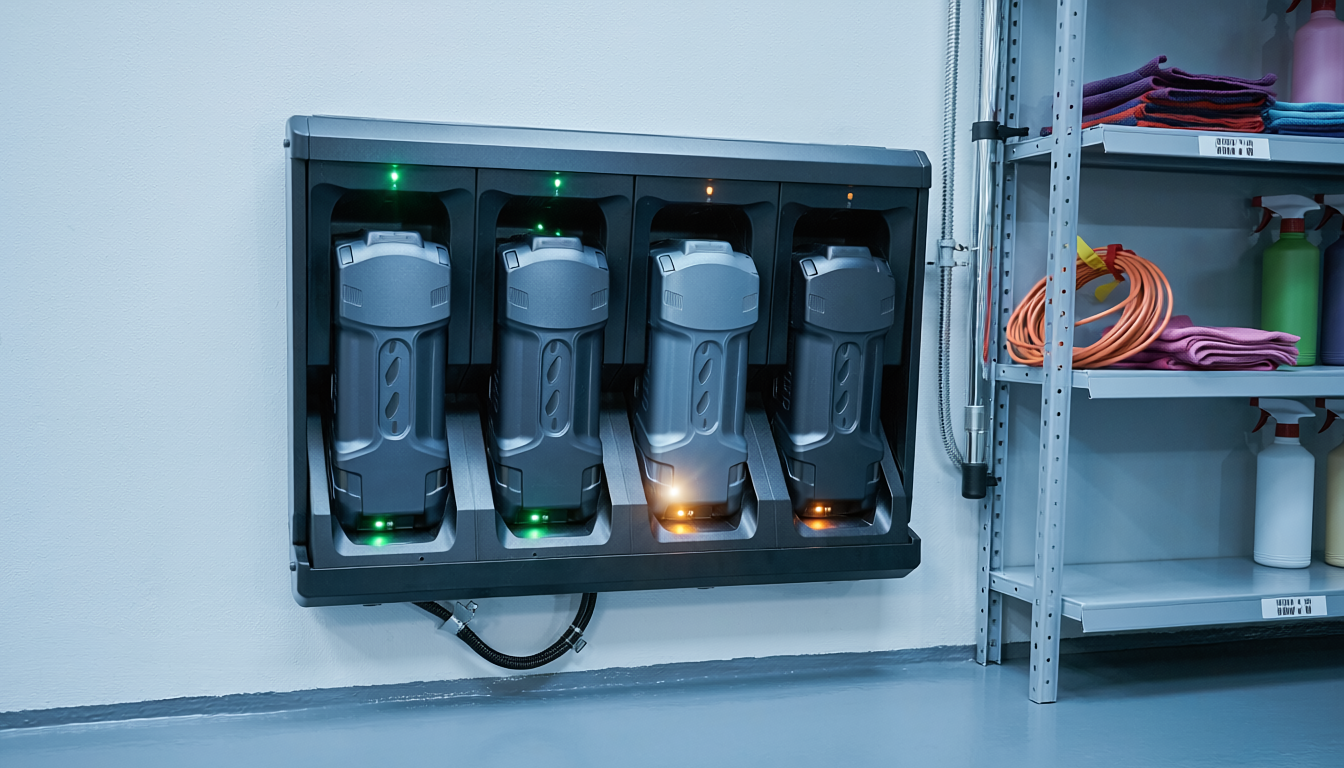
Professional cleaning operations don’t stop because a battery dies. The Pacvac Superpro 700 Battery Kit delivers continuous power through its four-battery rotation system, but only when you maintain it properly. Neglect the charging system, and you’ll face downtime, reduced runtime, and expensive replacements that could’ve been avoided.
Battery maintenance isn’t complicated, but it requires consistency. Most charging system failures stem from simple oversights – leaving batteries on chargers for days, storing them in hot vehicles, or ignoring early warning signs of degradation. These mistakes compound over time, turning a $50 maintenance issue into a $500 replacement problem.
The Pacvac charging system care approach centres on three principles: proper charging cycles, optimal storage conditions, and systematic rotation. Master these fundamentals, and your battery investment will deliver years of reliable service rather than months of declining performance.
Understanding the Pacvac 4-Battery System Architecture
The four-battery kit operates on a rotation principle that keeps your Pacvac Superpro 700 Backpack Vacuum running throughout extended shifts. While two batteries power your equipment, the other two charge, creating an uninterrupted workflow that commercial operations depend on.
Each battery contains lithium-ion cells that respond differently to charging patterns than older nickel-based technologies. Lithium-ion batteries don’t require full discharge cycles before recharging – in fact, partial discharge cycles actually extend their lifespan. This characteristic makes them ideal for professional cleaning environments where you need flexibility.
The charger itself manages multiple batteries simultaneously, but it’s not a “set and forget” device. Modern smart chargers monitor cell voltage, temperature, and charge state, but they can’t compensate for poor maintenance practices. Think of the charger as a sophisticated tool that requires informed operation rather than an automatic system that handles everything independently.
Daily Charging Protocol That Extends Battery Life
Start each day with a consistent Pacvac charging system care routine. Remove batteries from the vacuum immediately after your shift ends, even if they still hold charge. Batteries left in equipment can slowly discharge through the device’s electronics, creating a “vampire drain” that stresses the cells unnecessarily.
Inspect each battery before placing it on the charger. Look for physical damage, swelling, or unusual heat retention. A battery that’s still warm 30 minutes after use indicates potential cell degradation – set it aside for testing rather than immediately charging it.
The optimal charging sequence follows this pattern:
- Place batteries on charger within 2 hours of use
- Ensure charger sits in a ventilated area away from direct sunlight
- Allow batteries to reach room temperature if they’re unusually warm
- Remove batteries within 2 hours of charge completion indicator
- Store fully charged batteries in a cool, dry location
Never leave batteries on the charger overnight as a standard practice. While modern chargers include overcharge protection, keeping batteries at 100% charge for extended periods accelerates capacity loss. We’ve measured a 15-20% capacity reduction over 12 months in batteries consistently left on chargers compared to those removed promptly after charging.
Temperature Management for Optimal Performance
Battery chemistry responds dramatically to temperature extremes, which is why understanding the lithium-ion optimal charging temperature is critical to battery longevity. Charging a cold battery (below 10°C) forces lithium ions through sluggish electrolyte, creating uneven plating that permanently reduces capacity. Charging a hot battery (above 35°C) accelerates chemical breakdown that shortens overall lifespan.
The lithium-ion optimal charging temperature range sits between 15°C and 25°C. If your batteries feel cold to the touch after storage, let them warm to room temperature for 30 minutes before charging. This simple step prevents the micro-damage that accumulates over hundreds of charge cycles.
Storage temperature matters equally. A battery stored at 30°C loses capacity twice as fast as one stored at 20°C. If you’re keeping batteries in a vehicle or storage shed, understand that summer temperatures can easily reach 50°C inside these spaces – hot enough to permanently damage cells within weeks.
Consider this real scenario: A contract cleaning company stored their backup batteries in a van’s glove compartment during Perth’s summer. Within three months, those batteries held 60% of their original capacity. The replacement cost exceeded $400 – money that could’ve been saved by storing batteries in a climate-controlled office.
The Four-Battery Rotation Strategy
Effective rotation prevents uneven wear across your battery set. Without a system, you’ll naturally favour certain batteries, causing some to degrade faster than others. This creates a situation where you think you have four batteries but effectively only have two reliable ones.
Mark each battery with a number (1-4) using a permanent marker or label. Track usage through a simple log – nothing complex, just which batteries you used each day. This visibility reveals patterns that would otherwise go unnoticed.
A practical rotation schedule looks like this:
- Monday: Use batteries 1 and 2, charge 3 and 4
- Tuesday: Use batteries 3 and 4, charge 1 and 2
- Wednesday: Use batteries 1 and 3, charge 2 and 4
- Thursday: Use batteries 2 and 4, charge 1 and 3
- Friday: Use batteries 1 and 4, charge 2 and 3
This pattern ensures each battery receives equal work and rest cycles. Equal usage means equal degradation, so when batteries eventually need replacement, they’ll all reach end-of-life around the same time rather than forcing you into multiple separate purchases.
Recognising Early Warning Signs of Battery Degradation
How do you spot battery issues before they cause a mid-shift failure? Knowing how to identify rapid capacity degradation signs lets you act before unexpected failures occur. Batteries don’t fail suddenly – they give you advance warning if you know what to watch for.
Runtime decline is among the clearest rapid capacity degradation signs to monitor. If a battery that once powered a full 3-hour shift now dies after 2 hours, it’s lost approximately 33% of its capacity.
Physical changes signal problems too. Swelling indicates gas buildup from internal chemical reactions – a battery showing any bulging should be removed from service immediately. It’s not necessarily dangerous, but it’s definitely finished.
Charging behaviour changes reveal internal issues. A battery that charges significantly faster than its companions has likely lost capacity – it’s not charging faster because it’s better, it’s charging faster because there’s less capacity to fill. Similarly, a battery that takes much longer to charge may have developed high internal resistance.
Temperature abnormalities during charging warrant attention. All batteries warm slightly during charging, but one that becomes noticeably hotter than others is working harder to accept charge due to internal degradation. This battery should be tested and potentially replaced before it fails mid-shift.
Cleaning and Connection Maintenance
Battery contacts accumulate dust and residue that increases electrical resistance, with battery terminal oxidation being a common cause of performance loss. This resistance generates heat during charging and discharging, which accelerates wear on both the battery and charger contacts.
Clean battery terminals monthly using a dry microfibre cloth. For stubborn battery terminal oxidation, use a pencil eraser to gently remove buildup – it’s abrasive enough to clean without damaging the metal contact surface. Never use water or solvents on battery contacts, as moisture can cause corrosion.
Inspect the charger contacts with equal attention. These stationary contacts can accumulate more buildup than battery terminals because they’re not regularly removed and cleaned. A cotton swab works well for cleaning recessed charger contacts where cloth can’t reach effectively.
Check the physical fit between battery and charger. Contacts should make firm connection without excessive force. If you’re wiggling batteries to achieve proper seating, the contacts may be worn or damaged. This isn’t something you can fix yourself – contact the Weskleen Supplies team to assess whether you need charger service or replacement.
Long-Term Storage Protocols
If you’re storing batteries for more than two weeks – during holidays or seasonal downtime – proper preparation prevents permanent capacity loss. Lithium-ion batteries self-discharge slowly, but they also degrade faster when stored at full charge, making battery storage partial charge the recommended approach.
The optimal battery storage partial charge level sits at 40-60% capacity. This partially charged state minimises the chemical stress that occurs at both extreme ends of the charge spectrum. If your batteries show charge indicators, aim for two out of four bars before storage.
Store batteries in a cool, dry location away from metal objects that could create short circuits. A cardboard box in a climate-controlled room works better than a metal toolbox in a garage. Temperature stability matters more than absolute temperature – a consistent 20°C is better than fluctuating between 15-25°C.
Check stored batteries monthly. Recharge them to the 40-60% range if they’ve dropped below 30%. This periodic maintenance prevents deep discharge, which can trigger protective circuits that permanently disable the battery.
Troubleshooting Common Charging Issues
Problem: Charger light indicates error or doesn’t illuminate when battery is connected.
Solution: First, test with a different battery to isolate whether the issue is with the battery or charger. Clean all contacts thoroughly. If the problem persists with multiple batteries, the charger likely needs service.
Problem: Battery shows full charge but dies quickly during use.
Solution: This indicates capacity loss, not a charging problem. The battery is genuinely reaching “full” charge, but that full capacity has diminished. Runtime testing confirms this – if it’s lost more than 30% of original runtime, replacement is justified.
Problem: One battery in the set charges much slower than others.
Solution: Slow charging usually indicates high internal resistance. Test this battery’s runtime against others. If runtime is comparable, the battery may still be serviceable despite slow charging. If runtime is also reduced, plan for replacement.
Problem: Batteries feel warm even after sitting off the charger for hours.
Solution: This shouldn’t happen with healthy batteries. Warmth indicates ongoing internal chemical activity – potentially a short circuit or cell degradation. Remove this battery from service and seek assessment before further use.
Integration with Broader Equipment Maintenance
Battery care connects directly to overall vacuum performance. A weak battery forces the motor to draw more current to maintain suction, which stresses both the battery and motor unnecessarily. This creates a degradation cycle where weak batteries accelerate motor wear, and a struggling motor drains batteries faster.
The same discipline that maintains your charging system should extend to other equipment, your floor scrubbers, dust control mops, and any other tools in your cleaning fleet. Think of it like a commercial kitchen – you wouldn’t maintain the oven but ignore the refrigerator. Everything connects.
Document your maintenance activities. A simple logbook that tracks battery rotations, charging times, and any anomalies creates visibility into patterns you’d otherwise miss, apply the same approach to your Medusa Battery-Powered Sweeper and other cordless fleet equipment. This documentation proves invaluable when troubleshooting issues or planning equipment budgets.
Cost-Benefit Analysis of Proper Maintenance
The Pacvac 4-battery system represents a significant investment, but proper maintenance extends its useful life from 2-3 years to 4-5 years. That difference translates to substantial savings over a commercial operation’s equipment lifecycle.
Calculate it this way: A replacement battery costs approximately $120. Four batteries total $480. If poor maintenance forces replacement after 2 years instead of 4 years, you’re spending an extra $240 annually – money that could fund additional equipment or supplies.
Beyond direct replacement costs, consider operational impact. Battery failure mid-shift doesn’t just mean switching batteries – it means interrupted workflow, reduced productivity, and potentially incomplete cleaning tasks. A facility manager who budgets 3 hours for a cleaning job but experiences battery failure after 2 hours faces tough choices about what doesn’t get cleaned.
The time investment in proper Pacvac charging system care totals perhaps 10 minutes daily – removing batteries promptly, rotating them systematically, and storing them properly. That’s 50 minutes weekly to protect a $480 investment and ensure reliable operation. The return on this minimal time investment is exceptional.
Building Sustainable Maintenance Habits
Consistency matters more than perfection in Pacvac charging system care. You don’t need to execute every best practice flawlessly – you need to establish reliable routines that become automatic. Start with the highest-impact practices: removing batteries from the charger promptly, rotating them systematically, and storing them in appropriate conditions.
Create physical reminders that support good habits. A designated battery storage area, stocked with Mr. Bean All-Purpose Cleaner and cleaning essentials alongside charging equipment, keeps everything organised and accessible for efficient shift starts. A charging station in a climate-controlled space rather than a vehicle ensures appropriate temperature conditions. A simple rotation chart posted near your equipment removes the mental load of remembering which batteries to use.
Train anyone who handles the equipment on these protocols. Battery maintenance isn’t intuitive – it requires specific knowledge about lithium-ion chemistry and charging behaviour. A 15-minute training session prevents the casual mistakes that cause long-term damage.
Review your system quarterly. Are batteries performing as expected? Is the rotation schedule working? Have any unusual patterns emerged? This periodic assessment catches small issues before they become expensive problems.
Conclusion
The Pacvac 4-battery charging system delivers uninterrupted power for professional cleaning operations, but only when you maintain it with intention and consistency. Proper charging protocols, temperature management, systematic rotation, and attention to early warning signs transform batteries from consumable items into long-term investments.
The practices outlined here aren’t complicated, but they require discipline. Remove batteries promptly after charging. Rotate them systematically to equalise wear. Store them in climate-controlled conditions. Clean contacts regularly. Monitor performance for degradation signals. These simple habits extend battery life by 50-100% compared to neglectful practices.
Your cleaning operation depends on reliable equipment. Battery failure doesn’t just mean downtime – it means incomplete work, frustrated clients, and emergency replacement costs. The 10 minutes daily you invest in Pacvac charging system care prevents hours of disruption and hundreds of dollars in premature replacements.
For specific questions about your battery system or to discuss replacement options when batteries reach end-of-life, contact Weskleen Supplies on 1800 728 926 for guidance based on your operational needs.